


Microblink Identity
4.45.00 Reviews
App Specs
- Version
- 5.0.0
- Updated On
- License
- Free
- Downloads
- 10,000+
- Developer
- Microblink Ltd
- Categories
- Libraries & Demo
- Platform
- Android
Screenshots
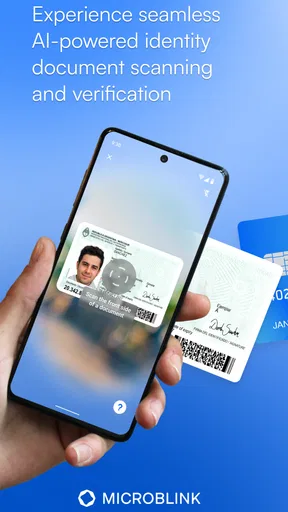
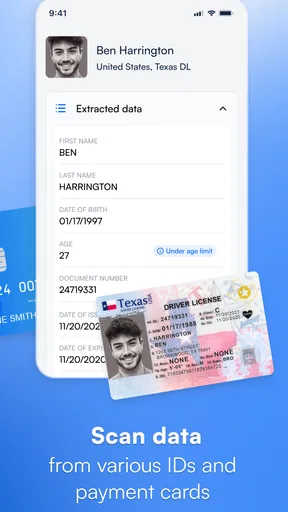
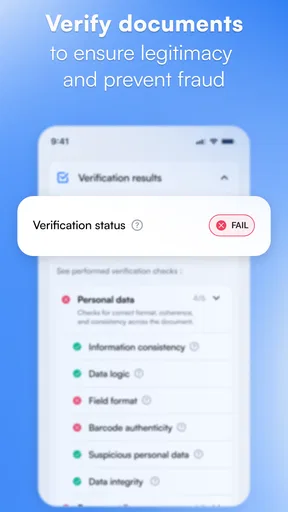

 Analysis by AppCompare
Microblink Identity is the kind of app that makes the most sense when you need to explore document-scanning technology rather than replace a full document-management suite. I spent time looking at it as a practical mobile utility, and my first impression is that its appeal comes from focus: it is built around identity-document scanning, not a crowded collection of unrelated tools. That narrow purpose makes it easier to understand, but it also means you should know exactly what you expect before installing it.
The app comes from Microblink Ltd and sits in the Libraries & Demo section. It is free to install, suitable for Everyone, and supports Android devices running version 7.0 or later. Its current release is 5.0.0, while the app first appeared on February 8, 2019. Those details matter because this is not presented like a casual photo scanner or a general office app; it is a demonstration-oriented product connected to a company known for document-recognition technology.
My overall view is positive, with an important qualification: Microblink Identity is most useful when you want to see how identity scanning works, not when you need a complete workflow for storing, organizing, editing, and sharing paperwork. For developers, testers, curious users, and people evaluating recognition technology, that distinction is central.
What the app feels like in current use
The experience is intentionally direct. Rather than asking you to learn a large dashboard, it points your attention toward the document in front of the camera. That simplicity is valuable when you are testing whether a document can be recognized quickly, because there are fewer unrelated controls competing for attention.
In everyday terms, I would think of it as a focused camera-based identity tool. You present a suitable document, align it in the scanning view, and let the recognition process do its work. The best results come from treating the scan like a small photographic task: use even light, keep the document flat, avoid reflections, and hold the phone steadily enough for the edges and printed details to remain clear.
That advice may sound obvious, but it is one of the main practical differences between a smooth scan and a frustrating one. A glossy card under a bright ceiling lamp can create a reflection across the exact area the camera needs to read. Likewise, a document held at a sharp angle may be visible to your eyes while still being difficult for an automated reader. I found that the app rewards a little preparation more than frantic movement.
The narrow design also makes the app approachable for someone who has never worked with document-recognition software. You do not need to understand optical character recognition, data extraction, or identity formats before trying it. The app gives you a concrete visual task, and that makes it easier to judge the technology from a user’s point of view.
Worth Reading Before You Choose

EA SPORTS FC Mobile 26 Is a Bigger Football Game, but It Takes Time

Flipboard Shows What News Apps Must Do Beyond the Feed

Switching to Android Auto Means Rethinking Your Driving Routine

Google Calendar Makes a Crowded Week Easier to Manage

Ludo King Makes the Most of the Minutes Between Plans

Baby Panda World Brings Quick Play to Modern Phones, but Its Game Library Feels Busy
At the same time, this is not the sort of tool I would choose as my only mobile scanner. A general document scanner is usually better for receipts, handwritten notes, multipage paperwork, and files that need cropping or exporting. Microblink Identity has a different purpose. Its value is tied to identity documents and the recognition experience around them.
A realistic use case beyond casual curiosity
Imagine that you are evaluating a mobile onboarding concept for a small project. You want to understand whether asking a user to scan an identity document feels natural, how much guidance the camera view needs, and how sensitive the process is to lighting. This app can serve as a quick hands-on reference before you commit to a larger solution.
Another realistic situation is a developer reviewing a prototype on several phones. Instead of discussing document capture only in theory, the team can use a focused demonstration app to observe how people position a document, where they hesitate, and which environmental conditions cause trouble. The useful insight is not merely whether a scan succeeds; it is how much human coaching the process appears to require.
For an ordinary user, the scenario is simpler. You may want to see what identity scanning feels like before using a similar process inside another service. In that role, the app can make an unfamiliar interaction less mysterious. It lets you understand the basic rhythm of presenting a document to a phone camera without first signing up for a separate service.
What the current version tells me about the product
The move to version 5.0.0 suggests a mature stage in the product’s numbered evolution, but I would not treat the version number alone as proof of a particular feature set. A major version label can reflect internal changes, a revised demonstration experience, or broader technical work, and the safest conclusion is simply that the app has continued developing since its original release.
What I can judge directly is the product’s present identity: it remains a specialized demonstration app from Microblink Ltd rather than a broad consumer productivity package. The current release is therefore best understood through its role. It gives users a compact way to interact with identity-document recognition, while the developer’s wider technical background explains why the app feels more like a focused showcase than a conventional scanner.
The app has an average rating of 4.4 from around 90 ratings, with 5 written reviews. I see that as encouraging but not definitive. It indicates that the people who chose to rate it generally responded well, yet the relatively small amount of feedback means I would not use the score alone to predict every phone model, document type, or lighting condition.
It has passed 10K+ installs, which is enough to show that the app has found a real audience without making it one of the huge mainstream scanning tools. That scale fits its specialist character. People are likely discovering it because they have a direct interest in Microblink’s identity-recognition approach, rather than because they are searching for a generic PDF scanner.
How the product’s evolution affects existing users
If you have used an earlier release, the practical question is not simply whether the version number changed. The more important question is whether the current experience still matches the reason you installed it. For users who wanted a concentrated identity-scanning demonstration, the app’s continued focus should feel familiar and useful.
A current release can also matter to developers and testers because mobile environments change over time. Phones, camera hardware, operating-system behavior, and user expectations do not stay still. Keeping the app current gives existing users a better chance of evaluating the present-day scanning experience rather than an old demonstration that no longer reflects modern devices.
Still, I would avoid expecting an update to transform this into a full identity-verification platform. The app’s role is narrower. If your workflow has grown from “show me how scanning works” to “capture, validate, store, audit, and manage identity information for real users,” you are now asking for a larger system than this app is designed to represent.
That is the key trade-off for returning users. The focused design is a strength because it keeps the demonstration clear. It is also a limitation because it does not automatically grow into every surrounding business process. I would keep it installed for evaluation and learning, but I would not mistake it for the complete foundation of a production identity workflow.
Small techniques that make testing more useful
My first tip is to test with controlled lighting before blaming the recognition process. Try a bright room with light coming from the side rather than directly into a reflective document. This gives you a better sense of the app’s actual behavior and avoids confusing glare with recognition weakness.
My second tip is to change one condition at a time. If you move from a dark room to a bright room while also changing the phone angle and document position, you learn very little. Keep the document steady, adjust the light, and then try a different angle. This turns a casual demonstration into a more meaningful test.
A third useful habit is to test the interaction from the perspective of a first-time user. Hand the phone to someone who has not been coached and watch where they place the document. Do not immediately correct them. Their hesitation reveals whether the scanning view communicates its expectations clearly enough. That kind of observation is more valuable than simply recording a successful scan.
I would also avoid using a damaged, folded, or heavily reflective document as your only test. A difficult sample can be useful later, but beginning with a clean, flat document helps establish a baseline. Once you understand the normal experience, you can explore the conditions that create friction and decide whether the app suits your intended audience.
Finally, separate recognition from administration. If your goal is to compare how quickly different apps capture a document, use the same phone position, lighting, and document for each attempt. If your goal is to manage personal paperwork, evaluate export, organization, and privacy controls separately with a tool built for those needs. Mixing these goals can make a specialized demo seem unfairly incomplete or a general scanner seem more capable than it really is.
Where it falls short for ordinary document work
The largest limitation is scope. Someone searching for a replacement for a home-office scanner may be disappointed because identity-document capture is not the same as scanning arbitrary pages. A receipt, school worksheet, handwritten list, or stack of invoices belongs to a different category of task.
I would also hesitate to recommend it as the only app for anyone who needs a polished archive. People who routinely create searchable files, combine pages, annotate documents, rename scans, or send finished PDFs will probably be happier with a general-purpose document scanner. Those tools are designed around the life of a file after capture, while Microblink Identity is centered on the capture and recognition moment.
Another limitation is that success depends heavily on the physical scanning situation. That is normal for camera-based recognition, but it means the app cannot remove every real-world obstacle. Poor lighting, glare, awkward positioning, and unclear document surfaces can all make the experience less predictable. Users expecting a completely automatic process in every environment should lower their expectations.
There is also a difference between demonstrating identity recognition and making decisions about identity. The app can help someone understand the scanning interaction, but a serious organization would still need a broader process for handling users, reviewing results, and deciding what happens after capture. That is not a criticism of the app so much as a reminder not to assign it a job larger than its visible purpose.
For privacy-conscious users, I would approach any identity-document camera tool thoughtfully. Avoid experimenting in a crowded place, use documents only when you are comfortable doing so, and do not treat a demonstration as a reason to share sensitive information casually. The app is free, but “free” does not mean every possible use is automatically appropriate for every situation.
Who should install it, and who should choose something else
I would recommend it to developers exploring document-recognition interfaces, product teams testing an onboarding idea, students learning about mobile scanning, and curious users who want a direct look at identity-document capture. It is also a sensible reference point for anyone comparing a specialized recognition demo with the more familiar document-scanner apps found on phones.
I would be more cautious about recommending it to a family member who simply wants to scan household paperwork. For that person, the better choice is usually an app built around pages, files, folders, and sharing. The same applies to freelancers who need a reliable receipt archive or students who want to turn lecture notes into organized documents.
Businesses should be especially clear about the boundary. If you are only evaluating the front-end scanning interaction, this app can be useful. If you need a complete operational workflow, choose a solution that explicitly covers the steps after recognition as well. A demonstration can inform that decision, but it should not be mistaken for the entire implementation.
The app’s Everyone content rating makes it approachable for a broad audience, and the free price removes the usual financial barrier to trying it. Even so, suitability depends more on purpose than age or cost. A free specialized tool can be a better fit for a technical evaluation than an expensive general package, while being the wrong fit for everyday file management.
What I would watch in future releases
For future development, I would watch how clearly the app communicates scanning conditions to people who have never used identity-recognition software. Better guidance can reduce the need for verbal instructions, especially when users are holding a phone and document at the same time.
I would also pay attention to how the experience behaves across a wider variety of phones and real environments. A demonstration is most valuable when it helps people understand not only the ideal result but also the boundaries of the technology. Clear handling of difficult lighting, reflective surfaces, and imperfect positioning would make the app more informative for both testers and everyday observers.
Another area worth watching is the balance between a clean demo and practical follow-through. The app should not lose its focus by becoming overloaded, but users evaluating a real workflow may benefit from clearer explanations of what the captured result represents and how it fits into a larger process. The challenge is adding context without turning a concise demonstration into a complicated business tool.
I would not expect every future change to be visible as a dramatic new button. Improvements to camera guidance, compatibility, responsiveness, or the way the app frames the scanning task could matter more than a long feature list. For this kind of product, quiet refinements may have a larger effect on usability than flashy additions.
After using it as a focused identity-scanning experience, I see Microblink Identity as a useful specialist app with a clear boundary. It is free, easy to approach, and backed by Microblink Ltd, while its current 5.0.0 release shows that the product has continued beyond its launch. The rating and install figures suggest a modest but generally receptive audience, though they are not a substitute for testing the app with your own phone and documents.
My recommendation is straightforward: install it if you want to understand or evaluate identity-document scanning. Use good lighting, test deliberately, and observe how a first-time user handles the camera interaction. Skip it if your real need is a multipage archive, PDF editor, receipt organizer, or complete identity-management system. Its strength is concentration, and its limitation is the same concentration. Once you view it that way, it becomes easier to appreciate what it does well without asking it to become an entirely different kind of app.
For me, that makes Microblink Identity worthwhile as a practical reference and demonstration tool. It is not the universal scanner some users may initially imagine, but for the specific question of how identity documents can be captured on a mobile device, it offers a focused place to start.
Pros
- Fast document scanning and identity verification
- Supports passports
- IDs
- and driving licenses
- Uses OCR to reduce manual data entry
- Helpful for secure onboarding and KYC workflows
- Can verify documents without visiting an office
Cons
- Availability of features may depend on the service provider
- Some older or damaged documents may scan poorly
- Requires a clear camera and adequate lighting
- Identity checks may feel intrusive to privacy-conscious users
- Verification can fail if personal details do not match
FAQs for Microblink Identity
What is Microblink Identity used for?
Microblink Identity is an identity-verification solution designed to help businesses confirm a person’s identity remotely. It can typically analyze identity documents, such as passports, national identity cards, or driver’s licenses, and may use additional checks to compare the document with the person presenting it. It is mainly intended for organizations integrating verification into their own apps or services, rather than everyday users looking for a standalone utility.
Which identity documents can Microblink Identity recognize?
The documents supported by Microblink Identity depend on the specific implementation, country, document type, and version used by the business. In general, the technology is designed to read information from many passports, identity cards, and driving licenses, including machine-readable zones and document images. Before starting verification, users should ensure their document is valid, undamaged, fully visible, and supported by the service requesting the check.
Does Microblink Identity require access to my camera or personal information?
Yes, identity verification normally requires camera access so the application or integrated service can capture images of your identity document and, in some cases, your face. The process may also involve collecting document details, verification results, and technical information needed to detect fraud or confirm authenticity. The exact data handling depends on the company using Microblink’s technology, so reviewing that company’s privacy policy is essential before proceeding.
Why might my identity verification fail?
Verification can fail for several practical reasons, including poor lighting, glare, blurry images, an unsupported document, expired identification, cropped edges, or information that cannot be read clearly. A mismatch between the document and the person completing the check may also cause rejection. Try using a clean camera lens, placing the document on a flat surface, avoiding reflections, and following the on-screen instructions carefully before submitting another attempt.
Is Microblink Identity safe and available as a regular mobile app?
Microblink Identity is generally a technology solution that businesses integrate into websites, mobile applications, or verification workflows, so availability may vary rather than appearing as one universal consumer app. Its security depends on how the service is configured and how the organization stores and processes submitted data. Only complete verification through a trusted company’s official website or application, and avoid sending identity documents through unofficial download links or unknown services.


